

TL;DR:
- An effective AI skills training workflow combines active practice, evidence-based evaluation, and progress tracking to build practical competence. It emphasizes modular skills, verification gates, a structured three-stage cycle, and ongoing adoption measurement for continuous improvement. This approach accelerates skill acquisition and enhances long-term performance in real-world AI tasks.
An AI skills training workflow is a structured, modular learning process that combines active practice, evidence-based evaluation, and iterative skill building to accelerate AI competency. Professionals and students who follow a deliberate AI skills training workflow gain practical, production-ready abilities far faster than those who rely on passive study or ad hoc experimentation. Research shows that integrating AI into learning can reduce skill acquisition time by 50–80% compared to traditional methods. That figure is not a rounding error. It reflects what happens when you replace passive reading with active, feedback-driven practice inside a well-designed workflow.
What key components make up an effective AI skills training workflow?
A well-built AI skills workflow has four non-negotiable components: modular skill sets, evidence loops, a structured training cycle, and adoption tracking. Miss any one of them and your learning stalls at the theoretical stage.

Modular canonical skills
Modular AI workflows rely on what practitioners call "canonical skills," which are lightweight, task-specific instruction sets that load only when needed. This approach keeps your workflow lean and prevents system bloat, the single most common cause of inconsistent AI behaviour. Instead of writing a new prompt from scratch every session, you build a small library of reusable instructions that produce predictable results. Think of each canonical skill as a well-tested recipe: you follow it, adjust for context, and get a reliable output every time.
Evidence loops and evaluation gates
Evidence loops are verification steps built directly into your workflow. Evaluation gates require the AI to check its own output against defined criteria before you accept the result. This single habit separates learners who produce trustworthy work from those who accept the first plausible-sounding answer. Without evaluation gates, AI outputs carry hidden errors that compound over time.
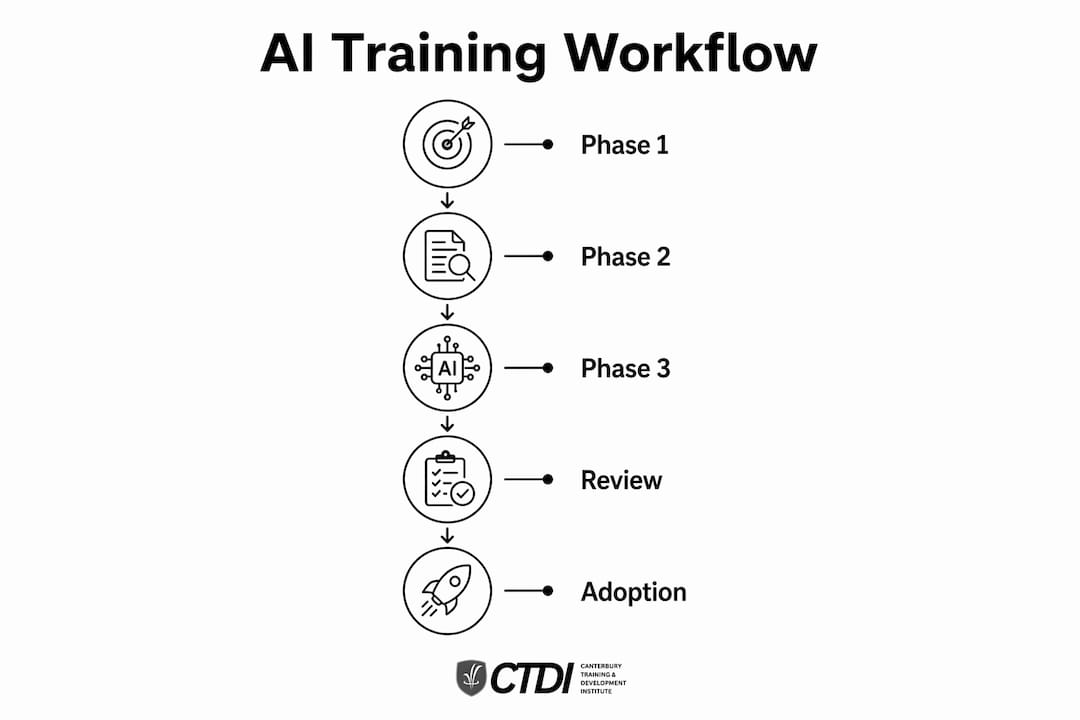
The three-stage training cycle
Effective workflows use a three-stage training cycle per session: pre-work to set context and goals, a 60-minute live practice block, and post-work adoption tracking to measure what actually transferred into daily use. The post-work stage is where most learners cut corners. Skipping it means you have no data on whether the skill stuck.
- Pre-work: Review the canonical skill, define the session goal, and prepare your practice scenario.
- Live practice: Work through real tasks using the AI, apply the Feynman technique, and log what surprised you.
- Post-work: Record outcomes, note gaps, and update your progress log before the next session.
Pro Tip: Set a recurring 15-minute post-session review in your calendar. Learners who complete post-work tracking consistently outperform those who skip it, because they catch misconceptions before they calcify.
How to design and structure your AI skills training workflow step-by-step
A structured AI learning roadmap from beginner to expert level typically spans 3–5 months, covering prompt engineering, workflow building, and autonomous agent development in sequence. The timeline is realistic because each phase builds directly on the last.
Phase 1: Foundational prompt engineering (weeks 1–2)
Start with the mechanics of prompting before touching any advanced tooling. Your goal in this phase is to understand how AI models interpret instructions and where they fail.
- Write 10 prompts daily across different task types: summarising, drafting, analysing, and classifying.
- Test each prompt twice with small variations and compare outputs.
- Document which prompt structures produce consistent results and which produce drift.
- Build your first three canonical skills from the patterns you observe.
By the end of week two, you should have a working prompt library and a clear sense of where your AI tool's context window limits your results.
Phase 2: Building reusable workflow components (weeks 3–4)
This phase shifts from individual prompts to connected sequences. You are building the plumbing of your AI skills workflow.
- Combine two or three canonical skills into a single workflow that handles a multi-step task.
- Add an evaluation gate after each major output step.
- Test the workflow on a real work or study task, not a synthetic exercise.
- Log the time saved and the error rate compared to your manual process.
Pro Tip: Treat your workflow files like code. Use version numbers (v1, v2) and keep old versions. You will want to roll back when a new prompt structure performs worse than expected.
Phase 3: Autonomous AI agent loops and projects (months 3–5)
The final phase introduces agentic loops, where the AI completes multi-step tasks with minimal intervention. Treating AI skills learning as a local software project with structured documentation provides tangible proof of competence that you can show employers or clients.
- Create a local project directory with files named
progress.md,sources.md,notes.md, andexercises.md. - Assign yourself one end-to-end project per month that requires the AI to complete at least five sequential steps.
- Review the project output against a defined quality checklist before marking it complete.
- At the 30-day and 90-day marks, run an adoption review: how many of your new AI skills are now part of your daily work?
| Phase | Duration | Core focus | Key output |
|---|---|---|---|
| Foundational prompting | Weeks 1–2 | Prompt mechanics and canonical skills | Prompt library of 20+ tested instructions |
| Workflow building | Weeks 3–4 | Multi-step sequences and evaluation gates | Two working, documented workflows |
| Agentic projects | Months 3–5 | Autonomous loops and portfolio projects | Three completed projects with progress logs |
The table above shows that each phase produces a concrete deliverable. Deliverables matter because they convert learning into evidence of competence.
What tools and techniques accelerate AI skills acquisition?
The right tools do not replace a good workflow. They amplify one. The techniques below work because they force active engagement rather than passive consumption.
The Feynman technique in AI learning
Applying the Feynman technique means explaining a concept back to the AI in simple language, then asking the AI to identify gaps or errors in your explanation. This flips the dynamic from student-receiving to student-teaching, which is where retention actually happens. If you cannot explain a concept simply, you do not understand it yet. The AI becomes a patient examiner rather than a search engine.
AI-based personalised curriculum generators
Personalised curriculum generators use your stated goals, current skill level, and available time to produce a sequenced learning plan. Claude and Microsoft Copilot both support this use case when prompted correctly. The key is to give the AI your constraints upfront: "I have 45 minutes per day, I know basic Python, and I want to build an automated report workflow in six weeks." Vague inputs produce vague plans.
Socratic dialogue and instant feedback
Socratic dialogue means asking the AI to question your reasoning rather than confirm it. Instead of "Is this prompt correct?", ask "What are three ways this prompt could fail?" This technique surfaces blind spots that passive study never reveals. AI-driven productivity gains in professional settings consistently come from teams that use AI as a thinking partner, not a task executor.
"The biggest shift in AI skills learning is not learning to use the tools. It is learning to question the outputs. Learners who build verification habits early produce work that holds up under scrutiny. Those who skip verification produce confident-sounding mistakes."
- Avoid overloading the AI's context window with background information it does not need for the current task.
- Use one canonical skill per session goal rather than stacking multiple instruction sets.
- Always verify AI outputs against a second source or your own domain knowledge before acting on them.
- Build feedback into every session, not just at the end of a module.
Common challenges in AI skills training workflows and how to avoid them
Most AI training workflows fail for predictable reasons. Knowing the failure modes in advance lets you design around them.
The "more context is better" trap
More prompt context is not always better. Overloading an AI with background information degrades output quality because the model struggles to prioritise what matters. Modular, context-light instructions consistently outperform long, detailed prompts for routine tasks. The fix is simple: strip your prompts back to the minimum needed for the task, then add context only when the output is clearly wrong.
System bloat from unmanaged workflows
Workflows grow without discipline. Each new prompt, instruction, or workaround adds weight. Building a small set of reusable modular instructions keeps AI behaviour predictable and reduces hallucinations. Review your canonical skills library monthly and retire any instruction that duplicates another.
Skipping adoption metrics
Tracking 30-day and 90-day adoption metrics is the difference between knowing a skill and using it. Most corporate AI rollouts fail because they measure completion rates, not usage rates. Completion means you finished the module. Adoption means you applied the skill in real work. Track both.
Pro Tip: Create a simple weekly log with two columns: "Skills practised" and "Applied in real work." After 30 days, the gap between the two columns tells you exactly where your workflow needs reinforcement.
- Passive learning overload: Watching tutorials without practising produces the illusion of competence. Cap passive content at 20% of your weekly learning time.
- AI forgetfulness: AI models do not retain context between sessions. Start each session by reloading your canonical skills and the relevant project context.
- No approval gating: Accepting AI outputs without a verification step embeds errors into your workflow. Add a one-sentence quality check to every output before you use it.
- Skipping the Feynman step: Learners who never explain concepts back to the AI consistently underestimate their own knowledge gaps.
The essential AI skills for career growth that employers value most are not just technical. They include the judgement to verify AI outputs and the discipline to maintain a structured workflow under time pressure.
Key takeaways
A structured AI skills training workflow built on modular canonical skills, evidence loops, and 30-day and 90-day adoption tracking is the most reliable path from beginner to production-ready AI competency.
| Point | Details |
|---|---|
| Start with canonical skills | Build a small library of reusable prompt instructions before attempting complex workflows. |
| Use the three-stage cycle | Pre-work, live practice, and post-work tracking must all happen every session for skills to transfer. |
| Apply evaluation gates | Require the AI to check its own output before you accept it to catch errors early. |
| Track adoption, not just completion | Measure whether skills appear in your daily work at 30 and 90 days, not just at course end. |
| Treat learning as a project | Maintain a local directory with progress logs and deliverables to build a credible competence record. |
What I have learned from building AI workflows from scratch
The advice I see repeated most often about AI skills training is to "start with the basics and build up." That is correct but incomplete. The part nobody tells you is that the workflow structure matters more than the tools you choose.
I have watched professionals spend weeks mastering a specific AI platform only to abandon it when a better tool appeared. The ones who kept their skills were those who had built reusable canonical skills and documented their workflows. Their instructions transferred to the new tool in hours. The platform-dependent learners started from zero.
The other thing I would push back on is the idea that more practice automatically means more progress. Practice without feedback loops is just repetition. The online learning workflow that actually works is one where every session ends with a written record of what you learned, what failed, and what you will do differently. That record becomes your most valuable asset over time.
Blending human judgement with AI automation is not a soft skill. It is the technical skill that separates competent AI users from genuinely capable ones. The AI will produce confident, fluent, plausible-sounding output. Your job is to know when to trust it and when to push back. That judgement only develops through deliberate, structured practice with evidence loops built in from day one.
— Sam
Advance your AI career with Edu
Canterbury Training and Development Institute (CTDI) offers nationally recognised online diplomas in Artificial Intelligence designed for professionals and students who need flexible, career-focused training. Edu's courses are built by industry practitioners and structured around the same modular, evidence-based principles that make AI skills stick in real work settings.

Whether you are building your first AI workflow or moving into advanced agentic systems, Edu's Diploma of Artificial Intelligence gives you a credentialled pathway that employers recognise. The programme is 100% online and self-paced, so you can progress without disrupting your current role. Visit the enrolment page to review course details and secure your place.
FAQ
What is an AI skills training workflow?
An AI skills training workflow is a structured, modular learning process that combines active practice, evidence loops, and adoption tracking to build production-ready AI competency. It differs from passive study by requiring learners to verify outputs and apply skills in real tasks.
How long does it take to develop AI skills from scratch?
A structured roadmap from beginner to expert level typically spans 3–5 months, covering prompt engineering, workflow building, and autonomous agent development in sequence. Learners who follow a modular, evidence-based approach reach practical competency significantly faster than those using unstructured self-study.
Why do most AI training programmes fail to produce lasting skills?
Most programmes fail because they measure course completion rather than skill adoption. Tracking whether new AI skills appear in daily work at 30 and 90 days is the reliable indicator of genuine competency transfer.
What is the Feynman technique and how does it apply to AI learning?
The Feynman technique involves explaining a concept back to the AI in simple terms and asking it to identify gaps in your explanation. This active method reveals knowledge gaps that passive study misses and significantly improves long-term retention.
How do I avoid common mistakes in my AI skills workflow?
Keep prompts modular and context-light, add evaluation gates to every output step, and maintain a weekly log tracking which skills you have applied in real work. Reviewing and retiring duplicate canonical skills monthly prevents workflow bloat and keeps AI behaviour consistent.