

TL;DR:
- Most online learners struggle not due to content difficulty but because they lack a structured workflow. Implementing clear planning, active recall, accountability, and progress tracking significantly boosts course completion and retention rates. Integrating AI and microlearning tools enhances study efficiency when grounded in a well-designed, manageable system.
Most people who struggle with online study aren't failing because the content is too hard. They're failing because they have no system. Without a clear online learning workflow, even a well-designed course can feel like an endless list of tasks with no traction and no finish line. Completion rates for self-paced online courses hover around 25% without structured support, which tells you everything about what happens when learners are left to figure it out alone. This guide gives you a practical, evidence-backed framework to build a workflow that actually works.
Table of Contents
- Key takeaways
- Setting up your online learning workflow
- Building your workflow step by step
- Monitoring progress and fixing common problems
- AI and microlearning in your workflow
- My honest take on building a study workflow
- Ready to put your workflow into practice?
- FAQ
Key takeaways
| Point | Details |
|---|---|
| Structure beats willpower | A defined online learning workflow reduces decision fatigue and keeps you progressing through content consistently. |
| Retrieval beats re-reading | Replacing passive review with active recall dramatically improves long-term retention of course material. |
| Accountability drives completion | Manager or peer follow-up can lift self-paced completion rates from 25% to over 75%. |
| Track the right metrics | Monitor completion rate, assessment scores, time-on-task, and login frequency to catch disengagement early. |
| AI supports, not replaces | AI tools work best when grounded in your own course materials to avoid inaccurate or misleading outputs. |
Setting up your online learning workflow
Before you can build a great study workflow, you need the right foundation. That means choosing your platform, assembling your tools, and understanding how the pieces connect.
Platforms and learning management systems
Most online courses run through a learning management system (LMS), which is the central hub where you access content, submit assessments, and track your progress. Popular LMS platforms include Moodle, Canvas, and Blackboard, each offering different features around content delivery, feedback, and analytics. When selecting or evaluating your LMS, look for built-in progress tracking, automated reminders, and calendar integration. These LMS features for learners have a direct impact on whether you stay on track or lose momentum.
Hardware, software, and essential tools
You don't need expensive gear, but you do need reliable basics. A laptop or desktop with a stable internet connection is non-negotiable for video-heavy courses. A second screen helps enormously if you're taking notes while watching lectures.
For note-taking, apps like Notion, Obsidian, or even a simple Google Doc work well. The key is that notes live in one place, are searchable, and are easy to review. Avoid scattering information across three different notebooks and a handful of browser tabs.
Here's a comparison of common workflow tools aligned to different learner types:
| Tool | Best for | Key feature |
|---|---|---|
| Google Calendar | Schedule planners | Recurring study blocks and reminders |
| Notion | Visual learners | Flexible database and linked notes |
| Anki | Retrieval practice | Spaced repetition flashcard system |
| LMS dashboard | Progress trackers | Completion rates, grades, and time-on-task |
| Microsoft Teams or Slack | Peer and cohort learners | Embedded microlearning and group accountability |
Key workflow enablers
Three things separate learners who finish from those who don't: a planner tied to your course structure, a retrieval practice habit, and a basic grasp of your own learning analytics. A weekly planner that maps course modules to specific time slots removes the daily "where do I start?" decision. Retrieval practice tools like Anki or built-in LMS quizzes force your brain to work, which is where retention actually happens. And tracking your own data, even informally, tells you whether your current approach is working before an assessment tells you the hard way.

Pro Tip: Set up a recurring 15-minute weekly review every Sunday to check your LMS dashboard, update your planner, and write down three things you recall from the previous week's study without looking at your notes.
Building your workflow step by step
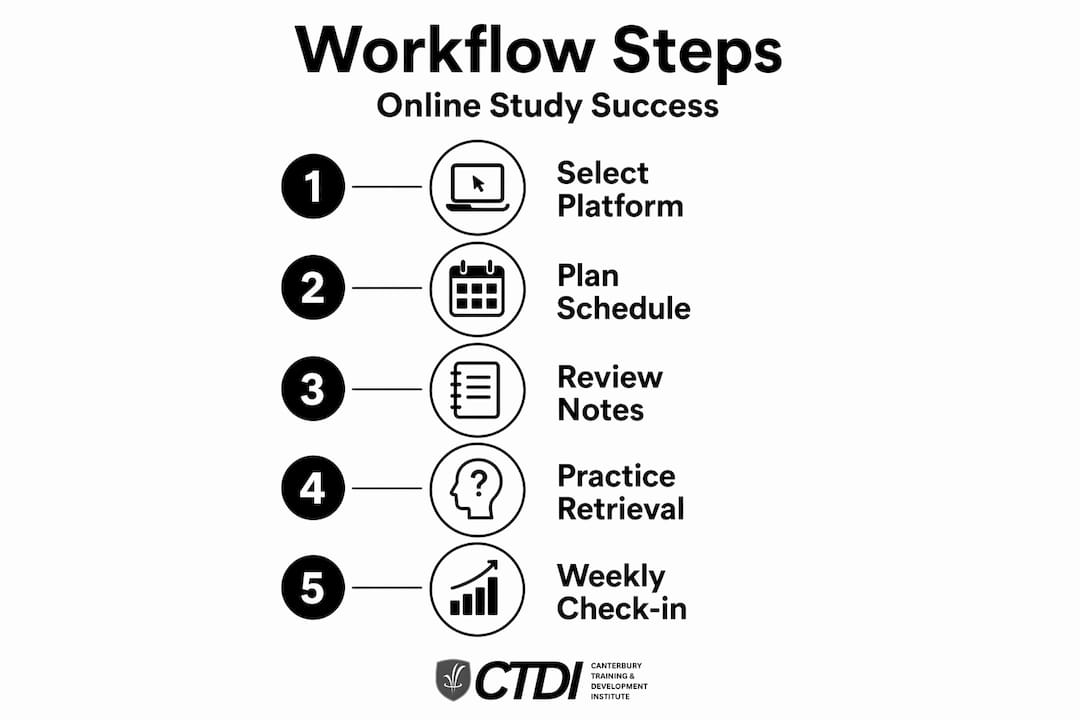
A good online learning workflow is built in layers. You start with structure, then add active study techniques, then layer in accountability. Here is a practical sequence you can follow from day one.
-
Map your course structure first. Log into your LMS and get a full view of the course before you begin. Note whether it is sequential (modules unlock one at a time) or open access (all content available upfront). Sequential self-paced workflows reduce cognitive overload by gating content, which works well when you're new to a topic. Open access suits multitaskers who prefer to move between topics.
-
Block your study time in a calendar. Treat study sessions like meetings you cannot cancel. Aim for short modules of around 20 minutes, which fit into busy schedules and maintain engagement far better than marathon study sessions. Multiple short sessions per week beat one long session on the weekend.
-
Start every session with retrieval, not review. Before you open your notes or re-watch a video, spend two minutes writing down everything you remember from the last session. This is retrieval practice, and it is deliberately uncomfortable. That discomfort is the mechanism by which retrieval practice improves retention more effectively than passive re-reading.
-
Engage with formative feedback as a learning tool, not a grade. Quizzes, short assignments, and discussion posts are not just assessment tasks. Research shows that online feedback improves cognitive outcomes significantly, particularly delayed formative feedback that makes you think before revealing the answer. Read every piece of feedback your instructor provides, even on tasks you passed easily.
-
Add a layer of human accountability. If you're studying for work, tell your manager what you're learning and schedule a brief discussion after each module. If you're a student, find a study partner in your cohort. Manager follow-up in self-paced learning lifts completion rates from roughly 25% to between 75% and 85%. That is the single biggest lever available to most learners.
-
Review your progress data weekly. Check your LMS dashboard for completion percentage, quiz scores, and time logged. If your scores are dropping or your login frequency is falling, that is a signal to adjust before you fall behind.
-
Do a monthly workflow audit. Ask yourself honestly whether your study schedule is realistic, whether your note-taking method is working, and whether you are completing assessments on time. Adjust one thing at a time so you can tell what made a difference.
Pro Tip: After each formative quiz, write a one-sentence summary of why you got each wrong answer wrong. This closes the feedback loop and prevents you from making the same mistake on a graded assessment.
Knowing that online feedback is a key instructional variable rather than just a motivational tool changes how you should approach every piece of feedback you receive in your course. Treat it as data, not commentary.
Monitoring progress and fixing common problems
Building a workflow is one thing. Keeping it running when life gets busy is another. The learners who finish their courses are not necessarily the most disciplined. They're the ones who notice problems early and adjust quickly.
The four metrics that matter
Effective learning dashboards should focus on four indicators rather than vanity metrics like "content views" or "time online." According to learning analytics best practices, the metrics that actually signal engagement and progress are:
- Completion rate: Are you finishing modules at the pace you planned?
- Assessment scores: Are your quiz and assignment results trending upward or stagnant?
- Time-on-task: Are you spending meaningful time on content, or rushing through it?
- Login frequency: Are you accessing the course regularly, or disappearing for days at a time?
Watch these four numbers together. A high completion rate paired with low quiz scores is a warning sign. It means you're clicking through content without absorbing it. Completion metrics alone are not reliable indicators of learning without corresponding assessment data.
Common pitfalls and how to fix them
Most workflow failures fall into a handful of predictable patterns. Here's what to watch for and what to do about each:
- Procrastination on starting. The fix is shrinking the task. Instead of "study for an hour," commit to opening your LMS and doing one quiz question. Starting is the hardest part, and momentum builds quickly once you begin.
- Rushing through content. This usually shows up as high completion with poor assessment scores. Slow down, re-engage with formative quizzes, and go back to the sections you rushed.
- Losing motivation around week three or four. This is where peer or manager accountability pays off. Schedule a catch-up with your study partner or manager specifically during the weeks you expect motivation to dip.
- Falling behind and giving up. Most courses allow extensions or have flexible pacing built in. Contact your trainer or support team before you fall too far behind. One conversation can reset your trajectory entirely.
- Poor note retention. If you cannot recall what you studied last week, switch to a retrieval-based note format. After each session, close your notes and write a summary from memory before comparing it to what you recorded.
AI and microlearning in your workflow
The most forward-thinking learners in 2026 are not just using their LMS. They're weaving AI tools and microlearning into their daily routines in ways that reduce friction and reinforce knowledge at the moment it's most needed.
AI-assisted learning done right
AI tools built on retrieval-augmented generation (RAG) are particularly well-suited to study workflows. A RAG-based learning assistant processes your course materials into chunks, creates embeddings, and retrieves context-relevant answers based only on what you've uploaded. This means you get precise, grounded responses rather than general internet answers that may contradict your course content.
The practical application is straightforward. Upload your course readings or notes to a RAG-enabled tool, then ask it to quiz you, explain a concept in simpler terms, or generate a practice scenario. The key is keeping the AI grounded in your actual materials. Grounding AI outputs in your own study content dramatically reduces the risk of the tool generating confident but incorrect information, which is a genuine risk with general-purpose chat tools.
You can also explore how AI skills connect to career outcomes to understand why building AI literacy into your learning workflow now is a smart long-term investment.
Microlearning embedded into daily work
Microlearning is not just short videos. At its best, it is bite-sized learning embedded into daily work tools like Microsoft Teams and Slack, delivering knowledge exactly when you need it. A notification in Teams linking to a three-minute explainer video, triggered by a task you've just been assigned, is far more effective than a two-hour training module scheduled for next Tuesday.
For professionals, the goal is to make learning invisible in the best possible sense. It happens around your work, not away from it. Set up channels in your communication tools for course-related discussions, share short summaries with colleagues, and look for LMS integrations that deliver content directly to the platforms you already use every day.
Pro Tip: Use AI chat tools as a drafting layer only. Always verify AI-generated study notes against your actual course materials before committing them to memory. Closed-loop systems that export atomic notes grounded in your materials are far more reliable than open-ended chat sessions.
My honest take on building a study workflow
I've spent years watching people approach online learning the way they approach a gym membership in January. Full of intention, poorly prepared, and out by week five. What I've noticed is that the people who stick with it rarely have more discipline than anyone else. They just have fewer decisions to make each day because their workflow handles the thinking for them.
The thing that surprised me most, after diving deep into this area, is how much accountability outweighs content quality. You can have a beautifully designed course from a world-class institution and still fail to finish it if nobody knows you're studying. The link between manager engagement and completion is frankly uncomfortable to read if you've always believed learning success is purely personal.
What I'd tell you from experience is this: don't start with tools. Start with one honest conversation. Tell someone whose opinion matters to you what you're studying and why. That single act of accountability changes the probability of you finishing more than any app or method you could adopt.
On the AI front, I'm genuinely enthusiastic but also cautious. I've seen learners get burned by treating general AI chat tools as authoritative sources, walking into assessments confident in answers that were simply wrong. The fix is not to avoid AI. It's to build a digital learning strategy that keeps AI in its lane as a study assistant, not a replacement for engaging with your course materials directly.
The best workflow is the one you'll actually follow next week. Start simple, track one or two metrics, and add complexity only when the basics are locked in.
— Sam
Ready to put your workflow into practice?
If this guide has clarified what your study process needs, the next step is choosing a course structure that supports it. Edu's online diplomas at the Canterbury Training and Development Institute are built around exactly the kind of self-paced, feedback-rich learning design described in this article. Courses in AI, digital marketing, and environmental management are delivered entirely online, with expert trainers who provide the structured feedback and check-ins that research shows actually drive completion.
Whether you're a professional upskilling for a career change or a student building a foundation in a high-demand field, CTDI's programmes give you the scaffolding to turn good intentions into a qualification. Course content is chunked into manageable modules, with regular formative assessments and access to trainer support throughout. Take the next step and explore your enrolment options to find the programme that fits your workflow and your goals.
FAQ
What is an online learning workflow?
An online learning workflow is a structured system for planning, completing, and reviewing digital course content consistently. It combines scheduling, active study techniques, progress tracking, and accountability mechanisms to improve completion and retention.
How do I improve my online course completion rate?
Adding human accountability is the most effective single change you can make. Research shows that manager or peer follow-up lifts self-paced course completion from around 25% to 75 to 85%.
What study techniques work best in a self-paced learning workflow?
Retrieval practice is the most evidence-backed technique. Writing down recalled material before reviewing notes, combined with formative feedback, consistently outperforms passive re-reading for long-term retention.
Can AI tools improve my online learning workflow?
Yes, when used correctly. AI tools grounded in your own course materials, particularly those using retrieval-augmented generation, can reduce cognitive load and provide precise, contextual study support without the risk of misinformation.
Which metrics should I track in my online learning workflow?
Focus on four indicators: completion rate, assessment scores, time-on-task, and login frequency. These four learning metrics together give a reliable picture of engagement and flag problems before they affect your results.