
If you want to learn to build PCs in Australia, three pathways cover almost every goal: the UEE20520 Certificate II in Computer Assembly and Repair for a nationally recognised credential, short hands-on workshops or private tutoring for fast practical skills, and self-paced online tutorials for hobbyists who just want to get started. Which one you need depends almost entirely on whether you want a qualification employers can verify or simply want to build your own machine.
- Career starters: UEE20520 is the formal route. It is listed on Training as the nationally recognised qualification, sits at AQF Certificate II level, and is delivered by registered RTOs and TAFEs across Australia.
- Hobbyists and quick learners: A single-day workshop, a Skillshare class like PC Building: Learn to Build a Custom PC by Felix Kruip, or the free How to Build Your Own Computer course on Alison will get you to a working build faster and for far less money.
- Deep learners: Nand to Tetris teaches computer architecture from first principles, free online, with a paid Coursera certificate option for those who want academic-level understanding.
As PCMag notes, anyone who can follow instructions and use a screwdriver can build a PC. The skill ceiling is lower than most beginners expect.
Key takeaways
The UEE20520 Certificate II is the only nationally recognised pathway for computer assembly in Australia, and verifying a provider's RTO code on training.gov.au before enrolment is the single most important step any prospective student can take.
| Point | Details |
|---|---|
| Career pathway | UEE20520 Certificate II is the nationally recognised qualification; verify providers on training.gov.au. |
| Hobbyist route | Alison's free course plus a hands-on workshop covers personal builds without the time or cost of a Certificate II. |
| Accreditation check | Always confirm the provider's RTO code and the course code UEE20520 before paying any fees. |
| Delivery trade-off | On-campus or blended delivery is necessary for practical competency; online-only is insufficient for assembly units. |
| Edu's approach | CTDI offers flexible, self-paced nationally recognised online study for learners who need accredited vocational qualifications. |
Table of Contents
- Which building computers course is right for you?
- Where to find accredited computer-building courses in Australia
- What UEE20520 Certificate II covers and the skills you will learn
- Entry requirements, duration, fees and delivery modes
- How to choose the right course or provider
- Fast alternatives: short online courses and workshops for hobbyists
- Job roles, career pathways and further study after Certificate II
- When does nationally recognised online training make sense?
- Nationally recognised online study with Edu
- Sources
Which building computers course is right for you?
The table below maps the three main pathways against the dimensions that actually matter for a decision.
| Pathway | Accreditation | Level | Delivery | Typical duration | Typical fees | Career outcome |
|---|---|---|---|---|---|---|
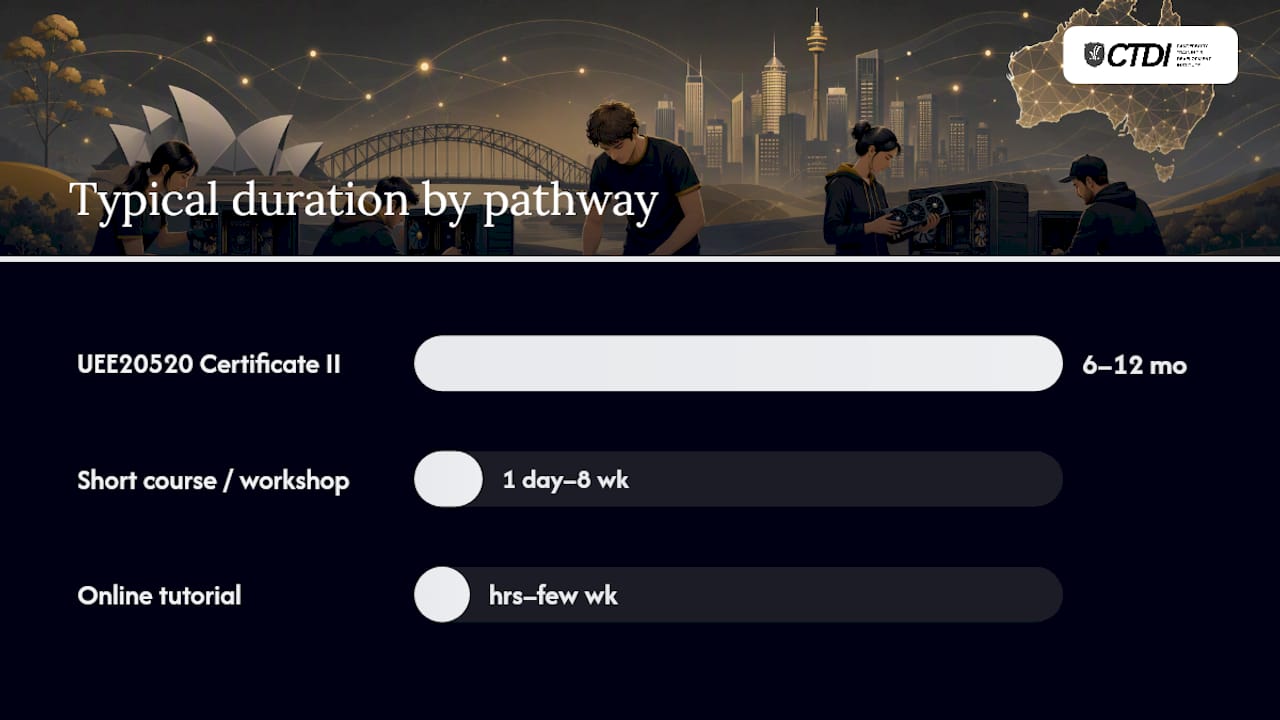
| UEE20520 Certificate II | Nationally recognised (RTO/TAFE) | AQF Certificate II | On-campus or blended | 6–12 months | Varies by provider; check provider page | Entry-level technician, ICT support |
| Short course / workshop | Not nationally recognised | Non-accredited | On-campus / in-person | 1 day to 8 weeks | varies significantly by provider and state | Hobbyist builds, informal upskilling |
| Online tutorial (Skillshare, Alison) | Not accredited | Introductory | Online, self-paced | Hours to a few weeks | free to low cost | Personal builds, pre-study prep |
Trade-offs worth knowing:
- The Certificate II takes longer and costs more, but it is the only pathway an employer can verify against a national standard.
- Short workshops give you bench time fast but carry no credential weight with most hiring managers.
- Online tutorials are excellent preparation before you touch hardware, but theory alone does not satisfy RTO competency requirements.
Red flags: Any provider advertising a "certificate" without an RTO code is selling a participation certificate, not a nationally recognised qualification. No hands-on bench time in a computer assembly class is another warning sign — you cannot demonstrate competency by watching videos alone.
Where to find accredited computer-building courses in Australia
Start with training.gov.au. Search the course code UEE20520 directly and you will see every active RTO currently approved to deliver it. Each provider listing shows their RTO code (their unique registered number), the units they deliver, and their contact details. That is the only reliable way to confirm a course is genuinely nationally recognised.
North Metropolitan TAFE in Western Australia is one example of a state TAFE offering practical VET courses aligned to national units, with on-campus facilities and structured timetables. The NMTAFE library guide also hosts sample unit guides and assessment support materials, which is useful before you enrol. TAFE SA covers South Australia with similar certificate-level training and established industry connections.
courses.com.au aggregates RTO and private short-course listings across Australia. It is a practical starting point for comparing what is available locally, though always cross-check any listing against training.gov.au before paying a deposit.
For international students, check the provider's CRICOS registration before applying. A CRICOS number confirms the provider is approved to enrol overseas students and sets the fee conditions that apply to you.
For workshops and private tutoring, look at:
- Local makerspaces and hackerspaces (most capital cities have at least one)
- Community college short courses
- Verified tutoring platforms and local classifieds (search for "PC building workshop" plus your city)
Pro Tip: Before contacting a provider, download the unit descriptor for at least one UEE20520 unit from training.gov.au. When you call, ask the provider how they assess that specific unit. A vague answer ("we watch you build a PC") is fine; no answer at all is a red flag.
What UEE20520 Certificate II covers and the skills you will learn
The Certificate II in Computer Assembly and Repair is built around practical competencies, not theory essays. The core skills map directly to what a hardware technician does on day one of a job.
Core skills covered:
- Selecting compatible components (CPU, motherboard, RAM, storage, PSU, GPU)
- Assembling and configuring desktop PCs and peripherals
- Workplace health and safety (WHS) procedures for electrical equipment
- Basic networking: connecting to a local area network, basic cable management
- Testing and troubleshooting: POST diagnostics, BIOS/UEFI setup, fault isolation
| Example competency area | What you can do after completing it |
|---|---|
| Component selection and compatibility | Build a parts list that avoids common incompatibilities (socket mismatch, RAM speed limits) |
| Physical assembly | Install CPU, cooler, RAM, storage and GPU; manage cables; seat the PSU |
| BIOS/UEFI configuration | Set boot order, enable XMP/EXPO for RAM, check hardware detection |
| Testing and diagnostics | Run POST, identify beep codes, use basic diagnostic tools |
| WHS and safe work practices | Handle components safely, manage static risk, follow electrical safety rules |
Intel's build guide recommends breaking the process into sequential steps and treating parts compatibility as the foundational skill. That maps almost exactly to how the Certificate II units are structured: plan first, build second, test third.
One practical detail worth knowing before your first bench session: on high-power graphics cards, the 12V-2×6 power connector must be pushed in until it clicks. Partial seating is a common cause of power or thermal failures that beginners mistake for a dead card.
For a solid grounding in computer hardware components before your first class, a component primer helps you arrive knowing what each part does rather than learning names and functions simultaneously.
Entry requirements, duration, fees and delivery modes
Who can enrol: UEE20520 has no formal academic prerequisites at most providers. You do not need a Year 12 certificate or prior IT experience. Some RTOs recommend basic computer literacy, but that is guidance rather than a gate. The course suits school leavers, career changers, and anyone wanting a formal credential in hardware.
Typical durations:
- Certificate II (UEE20520): 6–12 months full-time equivalent, though part-time study over 12–18 months is common at TAFEs
- Short courses and workshops: 1 day to 8 weeks depending on format
- Online tutorials (Alison, Skillshare): a few hours to a few weeks of self-paced content
Fees: Fees vary significantly by provider and state. Domestic students at state TAFEs may be eligible for government-subsidised fees under their state's VET funding arrangements. Check the provider's fee schedule directly. International students must check the provider's CRICOS listing for the applicable tuition fee, which is set separately from domestic rates.
Delivery modes and their limits:
- On-campus: Full practical access to bench equipment, supervised builds, and direct trainer feedback. The strongest option for hands-on competency.
- Blended: Theory online, practicals on-campus. Works well if you live within reach of the provider's campus.
- Online-only: Suitable for theory units and knowledge assessments, but insufficient on its own for a qualification that requires demonstrated assembly competency. An RTO offering a fully online Certificate II in computer assembly should be asked specifically how they assess physical build tasks.
How to choose the right course or provider
Use this checklist before you commit to any enrolment.
- Confirm the RTO code. Search the provider on training.gov.au. If they are not listed as a registered RTO, they cannot issue a nationally recognised qualification.
- Verify the course code. The qualification must be listed as UEE20520. A different code means a different (possibly older or non-current) qualification.
- Ask about practical hours. How many hours of supervised bench time does the course include? A Certificate II in assembly with fewer than 20–30 hours of hands-on work is thin.
- Check trainer qualifications. Trainers delivering VET units must hold a Certificate IV in Training and Assessment (TAE40116 or TAE40122) or an equivalent credential.
- Ask about assessment tasks. What does the assessment actually involve? "You assemble a PC and the trainer observes and signs off" is the correct answer. "You submit a written report" alone is not sufficient for a practical competency.
- Check facilities. Does the campus have dedicated hardware benches, component sets, and test equipment? Ask for a photo or a campus visit.
- CRICOS check for international students. Confirm the provider's CRICOS number if you are on a student visa.
Questions to ask the provider directly:
- "How many practical build hours are included in the course?"
- "Can I use the same components across multiple units, or does each unit require separate parts?"
- "Is the course delivered as UEE20520, and can you show me the unit list?"
- "What does the assessment brief for the assembly unit look like?"
Pro Tip: Ask the provider to email you a sample unit timetable or a blank assessment checklist. A confident RTO will send it within a day. One that stalls or says it is "not available" before enrolment is worth reconsidering. The accredited course selection guide walks through the full evaluation process if you want a structured framework.
Fast alternatives: short online courses and workshops for hobbyists
Not everyone needs a Certificate II. If your goal is to build your own gaming rig, upgrade a family machine, or simply understand what is inside a PC, a short course or tutorial gets you there in days rather than months.
What each format delivers:
- Single-day hands-on workshops: You build a PC under supervision, usually using the provider's components. You leave with the experience but no credential. Best for people who learn by doing and want immediate results.
- Skillshare (Felix Kruip's PC Building: Learn to Build a Custom PC): A project-based video walkthrough that covers component selection through to first boot. Practical and well-paced for hobbyists.
- Alison (How to Build Your Own Computer): Free, self-paced, and a solid introduction to component selection and assembly basics. Low barrier, no cost, and a good first step before spending money on parts or a paid course.
- Nand to Tetris: A different kind of course entirely. It teaches how computers work from logic gates up to a functioning operating system. Free online, with a paid Coursera certificate option. Not a build-your-own-PC course, but genuinely valuable for anyone who wants to understand why hardware works the way it does.
- YouTube tutorials: Linus Tech Tips, Gamers Nexus, and similar channels cover builds in real time. Excellent for visual learners, but no structure and no assessment.
When a short course is enough: If you are building for personal use, upgrading existing hardware, or preparing for a Certificate II, a tutorial or workshop is sufficient. When you need a credential for employment or further VET study, you need the Certificate II.
MSI's beginner build guide recommends building a compatible parts list before touching any hardware. That is genuinely the best preparation for any hands-on session, paid or free.
Pro Tip: Before your first hands-on session, build a parts list on PCPartPicker and check for compatibility warnings. Then bench-test your CPU, cooler, and RAM on the motherboard outside the case before installing everything. It takes ten minutes and saves hours of troubleshooting if something is dead on arrival.
Job roles, career pathways and further study after Certificate II
The UEE20520 Certificate II maps directly to entry-level hardware roles. Jobsandskills provides occupation profiles for ICT support engineers and hardware technicians, showing the typical tasks and skill levels these roles require.
Typical entry-level roles after completing Certificate II:
- Hardware technician (desktop and laptop repair)
- ICT support assistant (first-level helpdesk with hardware component)
- Computer assembly technician (build-to-order or repair workshop)
- Retail technical consultant (specialist computer retailers)
Pathways from Certificate II:
The Certificate II is a stepping stone, not a ceiling. Units completed at Certificate II level can stack toward a Certificate III in Information Technology or a Certificate III in Telecommunications, depending on the RTO's articulation arrangements. From there, Certificate IV and Diploma-level qualifications open pathways into network administration, cybersecurity, and systems support.
Apprenticeships in the ICT sector are less common than in trades, but some employers offer structured traineeships that combine on-the-job experience with formal VET units.
Building a portfolio: Log every assessed build with photos, a parts list, and the fault you diagnosed (if any). A folder of three to five documented builds is more persuasive in a job interview than a certificate alone, particularly for small repair shops that hire on demonstrated competence.
When does nationally recognised online training make sense?
Online nationally recognised training works well for theory-heavy units: WHS knowledge assessments, networking fundamentals, and written competency evidence. What it cannot replace is supervised bench time. An RTO's assessment rules require that practical competencies are observed and signed off by a qualified assessor. That means a fully online delivery for a hands-on qualification like UEE20520 needs a clear answer to one question: how does the RTO assess the physical assembly tasks?
Some RTOs use workplace assessment, where a supervisor at your job site acts as the assessor. Others require you to attend a practical session at a campus or partner facility. Both are legitimate. An RTO that offers UEE20520 entirely online with no practical component at all is not meeting the standard.
Flexible online study is most effective when it handles the theory load and frees up your time for the practical sessions that actually build competency. The best RTO arrangements let you work through knowledge units at your own pace, then schedule supervised bench time in blocks rather than attending weekly classes for months.
Edu (CTDI) delivers nationally recognised vocational qualifications online with flexible, self-paced study. While CTDI's current accredited offering focuses on AI, digital marketing, and environmental management rather than computer assembly, its model demonstrates how starting an online course with a registered RTO can fit around work and other commitments. For learners weighing up the value of practical skills in a formal qualification, the principle applies across vocational disciplines.
The honest case for picking your pathway early
For career-focused learners, the Certificate II is the clear answer. Not because it is the fastest route to building a PC, but because it is the only route that produces evidence an employer can verify. A hiring manager at a repair shop or IT support firm cannot assess your YouTube watch history. They can check a qualification on training.gov.au in thirty seconds.
For hobbyists, the Alison free course followed by a single hands-on workshop is genuinely enough. Spend the money you would have spent on a short "certificate" course on better components instead.
The one mistake worth avoiding: paying for a non-accredited course that uses the word "certificate" in its name. Check the RTO code first, every time.
Nationally recognised online study with Edu
There are several routes to building computer skills in Australia: TAFE campuses, private RTOs, short workshops, and free online tutorials. For learners who want a nationally recognised qualification delivered flexibly around work and life, Edu (CTDI) offers accredited online vocational study with self-paced delivery, industry-designed content, and student support built in.

CTDI's current accredited programmes cover AI, digital marketing, and environmentally sustainable management. If you are considering how online RTO study works before committing to any vocational pathway, CTDI's model gives you a clear picture of what flexible, accredited online learning looks like in practice. No fixed timetable, no commuting to campus for theory units, and a qualification that sits on the Australian Qualifications Framework.
Enrol now to see current programmes, or browse the Advanced Diploma of Digital Marketing as an example of how CTDI structures its online vocational delivery.